Movies
Movies can be added to a Jellyfin server using the "Movies" library type.
Most common video formats are supported by Jellyfin, such as mp4 and mkv. In addition, VIDEO_TS and BDMV folders are supported for movies and music videos. VIDEO_TS or BDMV folders do not support multiple versions, multiple parts or external subtitle/audio tracks.
.iso files and other disc image formats should work, but are not supported. It is recommended that disc image formats be remuxed into mkv containers, or extracted into VIDEO_TS or BDMV folders.
File names should match the name listed by your metadata provider whenever possible. However, certain characters cannot be used as they are reserved by jellyfin. Including them WILL cause problems. The following characters are known to cause issues: <, >, :, ", /, \, |, ?, *
Organization
Movies should be organized into individual folders for each movie. The folder can optionally contain extra files.
Movies
├── Best_Movie_Ever (2019)
│   ├── Best_Movie_Ever (2019).mp4
│   ├── Best_Movie_Ever (2019).nfo
│   ├── Best_Movie_Ever (2019).en_us.srt
│   ├── cover.png
│   └── theme.mp3
└── Movie (2021) [imdbid-tt12801262]
    ├── backdrop.jpg
    └── VIDEO_TS
        ├── VIDEO_TS.BUP
        ├── VIDEO_TS.IFO
        ├── VIDEO_TS.VOB
        ├── VTS_01_0.BUP
        ├── VTS_01_0.IFO
        ├── VTS_01_0.VOB
        ├── VTS_01_1.VOB
        └── VTS_01_2.VOB
Naming
The folder containing the movie should be named in the following format:
Movie Name (year) [metadata provider id]
The year and metadata provider id fields are optional, but they will help identify media more reliably.
The video files within the folder should have the same name as the folder. I.e. if the folder is named Super Fun Movie, the video file within should be named Super Fun Movie.mp4 (or any other extension), optionally with tags defined below.
- Example with name only:
Jellyfin Documentary.mkv - Example with year:
Jellyfin Documentary (2030).mkv - Example with metadata provider id:
Jellyfin Documentary [imdbid-tt00000000].mkv - Example with both year and metadata provider id:
Jellyfin Documentary (2030) [imdbid-tt00000000].mkv
Metadata providers
Jellyfin fetches information about the media automatically from external metadata providers for most types of content. Movies and shows can be named with a metadata provider ID to improve matching.
Movie Name (year) [metadata provider id]
Series Name (year) [metadata provider id]
Read more about it in the metadata provider identifiers section.
External Subtitles and Audio Tracks
External Subtitles and audio tracks can be added with file suffixes.
Movies
└── Film (1986)
    ├── Film.mkv
    ├── Film.default.srt
    ├── Film.default.en.forced.ass
    ├── Film.forced.en.dts
    ├── Film.en.sdh.srt
    └── Film.English Commentary.en.mp3
Shows
└── Series Name A (2021)
    └── Season 1
        ├── Series Name A (2021) S01E01 Title.avi
        ├── Series Name A (2021) S01E01 Title.ja.ass
        └── Series Name A (2021) S01E01 Title.commentary.ja.aac
Each title/flag field can be a generic string, or a special flag. A file can have multiple flags, separated with .
| Type | Flag |
|---|---|
| Default | default |
| Forced | forced, foreign |
| Hearing Impaired | sdh, cc, hi |
hi collides with the Hindi language abbreviation. hi by itself will resolve as a Hindi language track, while hi in addition to another language identifier (such as title.en.hi.srt) will use the other language and tag it as hearing impaired.
Flags are ignored on containers with more than one stream.
Any arbitrary text not parsable to a language or flag will be combined and used as the title of the stream (if there is not a stream title already embedded in the file metadata). The last file in the above example will be parsed as an English mp3 audio stream with the title English Commentary.
Multiple Versions
Jellyfin supports storing multiple versions of the same video within a single movie folder by using filename suffixes. Each file must begin exactly with the parent folder name - including any year and/or metadata provider IDs - before adding a version label. This prefix must match character-for-character; otherwise, the files will be treated as separate movies.
Movie (2021) [imdbid-tt12801262]
├── Movie (2021) [imdbid-tt12801262] - 2160p.mp4
├── Movie (2021) [imdbid-tt12801262] - 1080p.mp4
└── Movie (2021) [imdbid-tt12801262] - Directors Cut.mp4
To distinguish between versions, each filename needs to have a space, hyphen, space, and then a label. Labels are not predetermined and can be made up by the user. The hyphen is required. Periods, commas and other characters are not supported.
Labels can optionally be placed between brackets with the same result as seen below.
Movies
└── Best_Movie_Ever (2019)
    ├── Best_Movie_Ever (2019) - [1080P].mp4
    ├── Best_Movie_Ever (2019) - [720P].mp4
    └── Best_Movie_Ever (2019) - [Directors Cut].mp4
If labels are not added to the end of filenames, as shown above, each file will be treated as a unique movie and not a version of the same movie.
Movie versions are presented in an alphabetically sorted list. An exception applies to resolution names, which are sorted in descending order from highest to lowest resolution. A version name qualifies as a resolution name when ending with either a p or an i. The first movie version in the list is the one selected by default. An example of sorting as seen below.
- Resolution sorting:
1080p,2160p,360p,480p,720p→2160p,1080p,720p,480p,360p - Named versions sorting:
Extended Cut,Cinematic Cut,Director's Cut→Cinematic Cut,Director's Cut,Extended Cut
To group media manually, long-click or right-click media to highlight then select additional media to merge. Use the new bar that appears to 'Group Versions'.
3D Videos
3D Videos are identified using flags in the file name. To identify 3D content by filename, the first tag is 3D, which must be combined with one of the following tags to specify the specific 3D format:
| Format | Flag |
|---|---|
| half side by side | hsbs |
| full side by side | fsbs |
| half top and bottom | htab |
| full top and bottom | ftab |
| Multiview Video Coding | mvc |
| Anaglyph | Not Supported |
The tags are case-insensitive and must be surrounded by either a space, hyphen -, dot ., or underscore _.
Awesome 3D Movie (2022).3D.FTAB.mp4
Awesome 3D Movie (2022)_3D_htab.mp4
Awesome 3D Movie (2022)-3d-hsbs.mp4
Series Name A (2022) S01E01 Some Episode.3d.ftab.mp4
Series Name A (2022) S01E02 Some Other Episode.3d.ftab.mp4
Series Name A (2022) S01E03 Yet another episode.3d.hsbs.mp4
Additionally, 3D filename tags can be combined with the grouping functionality in movie and music video libraries. All text before the hyphen must match the folder name.
Movies
└── Awesome 3D Movie (2022)
    ├── Awesome 3D Movie (2022) - 3D_FTAB.mp4
    ├── Awesome 3D Movie (2022) - 3D.hsbs.mp4
    └── Awesome 3D Movie (2022) - 1080p.mp4
Multiple Parts
Content that is split into multiple files can be stacked together if named correctly. Files should be named as follows:
Movie Name (2010)
├── Movie Name-cd1.mkv
├── Movie Name-cd2.mkv
└── Movie Name-cd3.mkv
Series Name A (2025)
└──Season 1
    ├── Series Name A (2025) S01E01-part-1.mkv
    └── Series Name A (2025) S01E01-part-2.mkv
The separator is optional between <parttype> and <partnumber>. <partnumber> can be any number, or the letters a-d.
Supported part types are:
cddvdpartptdiscdisk
Supported separators are:
.(period)-(dash)_(underscore)
This does not work with multiple versions or merging.
Extras
Extras can be added to movies, show series, show seasons, and music videos in a few different ways, as listed below.
Extras Folders
One of the cleanest ways of adding extras is to place them in subfolders within your media folders.
Supported folder types are:
behind the scenesdeleted scenesinterviewsscenessamplesshortsfeaturettesclipsother- Generic catch all for extras of an unknown type.extras- Generic catch all for extras of an unknown type.trailerstheme-musicbackdrops
Best_Movie_Ever (2019)
├── Best_Movie_Ever (2019).mp4
├── behind the scenes
│   └── Finding the right score.mp4
└── extras
    └── Home recreation.mp4
Awesome TV Show (2024)
├── Season 1
│   ├── Awesome TV Show (2024) S01E01 episode name.mp4
│   ├── trailers
│   │   └── trailer1.mp4
│   ├── theme-music
│   │   ├── Season 01 OP.mp3
│   │   └── Season 01 ED.flac
│   └── backdrops
│        └── S1Intro.mkv
├── interviews
│   └── Interview with the Director.mp4
└── theme-music
    └── Series Opening.wav
File Name
Some types of extras support a special option if you only have a single of that type. These options are to name the filename a specific word when stored in the same folder.
Supported filenames are:
trailersample
Best_Movie_Ever (2019)
├── Best_Movie_Ever (2019) - 1080P.mp4
└── trailer.mp4
Awesome TV Show (2024)
├── Season 1
│   ├── Awesome TV Show (2024) S01E01 episode name.mp4
└── sample.mp4
File Suffix
If you would rather keep everything in a single folder, you can append special suffixes to the filename which Jellyfin picks up and uses to identify the file as an extra. Note that, with a few noted exceptions, these suffixes DO NOT contain any spaces.
-trailer.trailer_trailertrailer- This is a space followed by the wordtrailer-sample.sample_samplesample- This is a space followed by the wordsample-scene-clip-interview-behindthescenes-deleted-deletedscene-featurette-short-other-extra
Best_Movie_Ever (2019)
├── Best_Movie_Ever (2019) - 1080P.mp4
├── Preview Trailer.trailer.mp4
└── Making of The Best Movie Ever-behindthescenes.mp4
Series Name A (2024)
├── Season 1
│   ├── Series Name A (2024) S01E01 episode name.mp4
│   └── Preview Trailer.trailer.mp4
└── making of Series Name A-behindthescenes.mp4
Theme media
Theme media gives browsing your library a more audio-visual touch by playing Theme songs and/or Theme videos in the background while you're looking at your media listings.
For these to play, users need to enable the option in their clients. In the WebUI and WebUI-based clients this is found in the User settings under Display > Libraries > Theme songs, and Theme videos, respectively. Implementations in third-party clients may differ.
In case both Theme songs and Theme videos are found and enabled, Theme videos will be preferred and Theme songs will not play.
In the WebUI and WebUI-based clients, if there are multiple Theme media found, they will be shuffled when opening the listing. This cannot be changed.
Songs
- theme.ext
- theme-music/*
Videos
- backdrops/*
Just like any other media, Theme media will be transcoded when required or requested by the client. However, since transcoding can result in delay of Theme media playback, Web-standard formats like WebM (VP9/Opus) are recommended for a smooth experience, as they generally direct play.
Example
- Movies
- Shows
Movies
└── Best_Movie_Ever (2019)
    ├── backdrops
    │   └── bluray-menu.ext
    ├── theme.ext
    └── theme-music
        └── awesome-soundtrack-song.ext
Shows
└── Series Name (2010)
    ├── backdrops
    │   ├── S1Intro.ext
    │   └── S2Intro.ext
    ├── Season 01
    │   ├── backdrops
    │   │   └── S1Intro.ext
    │   └── theme-music
    │       └── S1Intro.ext
    ├── Season 02
    │   ├── backdrops
    │   │   └── S2Intro.ext
    │   └── theme.ext
    ├── theme.ext
    └── theme-music
        ├── intro-song.ext
        └── outro-song.ext
Metadata Images
Images can either be provided as external files within the media folders, or embedded in the media files themselves. When external images are provided, they should be placed alongside the media files. When they are provided, they will take precedence over other sources.
Similar to media folders, an artist image can be placed in the root of an artist’s folder. It will be shown both when browsing artists and on the artist’s detail page.
- Music
- Movies
- Shows
Artist
├── Album
│   ├── cover.jpg
│   ├── backdrop.webp
│   ├── logo.png
│   ├── Track 1.m4a
│   └── Track 2.m4a
└── folder.jpg
When no images are provided for music, Jellyfin will take the cover image from the first track that has an embedded cover image.
Movie (2035)
├── cover.jpg
├── backdrop.webp
├── logo.png
└── Movie (2035).mp4
Series Name B (2018)
├── cover.jpg
├── thumbnail.jpg
└── Season 01
    ├── backdrop.webp
    ├── cover.jpg
    ├── logo.png
    ├── Series Name B S01E01.mkv
    ├── Series Name B S01E01-thumb.jpg
    ├── Series Name B S01E02.mkv
    └── Series Name B S01E02-thumb.jpg
Image types:
| Type | Description |
|---|---|
| Primary | The primary cover/artist image |
| Backdrop | Background image in media page 1 |
| Banner | Displayed when browsing library in banner mode. Video only. 2 |
| Logo | Logo displayed on the top of a media item. |
| Thumb | Thumbnail for homepage and for browsing library in thumb mode. Video only. 2 |
1Multiple backdrop images can be used to cycle through several over time. Simply append a number to the end of the filename directly after or after a hyphen, e.g. backdrop-1.jpg, backdrop2.jpg.
2These can be added to both video and audio content, but are not used by any client for audio content.
Filenames, their respective types and supported media types
Unless otherwise noted, all filenames can be used either standalone (e.g. logo.png) or as a suffix (e.g. movie-logo.png)
| Filename | Type | Movies | Series | Season | Episode | Music | Artist |
|---|---|---|---|---|---|---|---|
| poster | Primary | ✅ 2 | ✅ | ✅ | ✅ | ||
| folder | Primary | ✅ 2 | ✅ | ✅ | ✅ | ✅ | |
| cover | Primary | ✅ 2 | ✅ | ✅ | ✅ | ||
| default | Primary | ✅ 2 | ✅ | ✅ | ✅ | ||
| movie | Primary | ✅ 2 | |||||
| show | Primary | ✅ | |||||
| jacket | Primary | ✅ | |||||
| thumb (suffix) 1 | Primary | ✅ | |||||
| backdrop | Backdrop | ✅ 2 | ✅ | ✅ | ✅ | ||
| fanart | Backdrop | ✅ 2 | ✅ | ✅ | ✅ | ||
| background | Backdrop | ✅ 2 | ✅ | ✅ | ✅ | ||
| art | Backdrop | ✅ 2 | ✅ | ✅ | ✅ | ||
| extrafanart (folder) | Backdrop | ✅ 2 | ✅ | ✅ | ✅ | ||
| banner | Banner | ✅ | ✅ | ✅ | ✅ | ||
| logo | Logo | ✅ 2 | ✅ | ✅ | ✅ | ||
| clearlogo | Logo | ✅ 2 | ✅ | ✅ | ✅ | ||
| landscape | Thumb | ✅ | ✅ | ✅ | ✅ | ||
| thumb | Thumb | ✅ | ✅ | ✅ | ✅ |
1 For example: S01E01 Some Episode-thumb.jpg
2 These file names can also be embedded in supported media containers (e.g. mkv) and will be used when the Embedded Image Extractor source is enabled for movies.
Below is a screenshot showing the 3 main types of images in Jellyfin
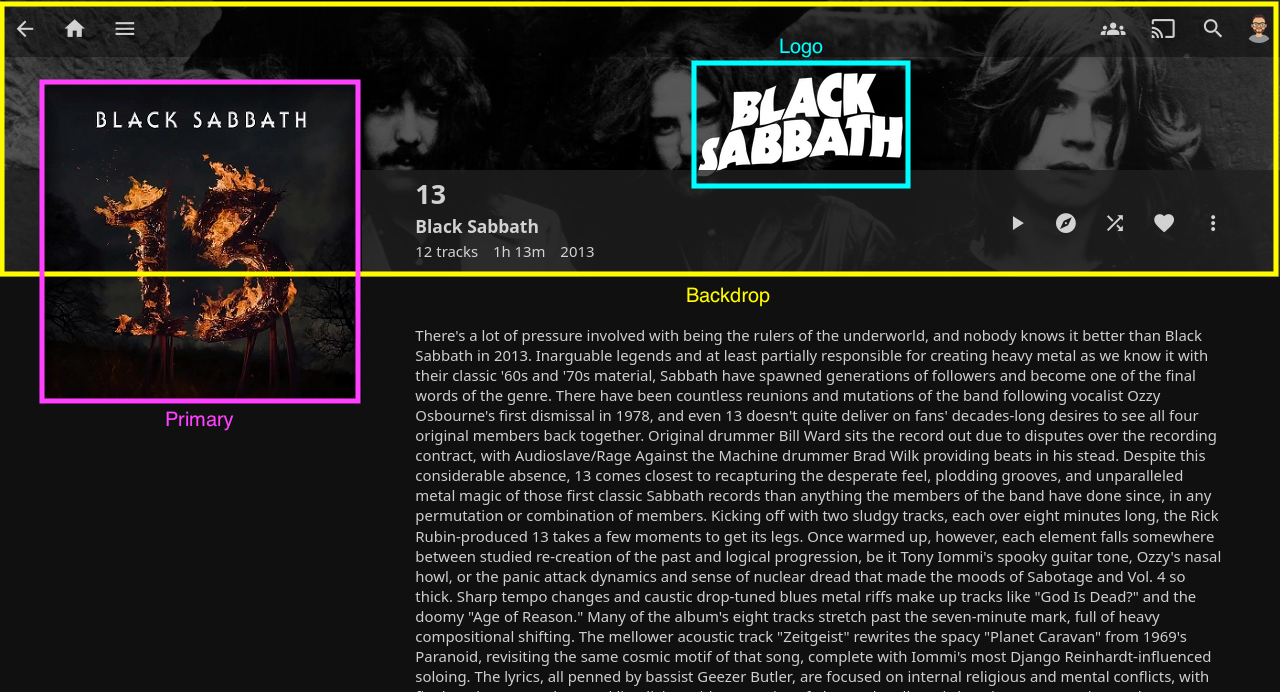
Unused types are listed below. While they are unused by official clients, they may be used by 3rd party clients.
| Type | Description |
|---|---|
| Art | Unused |
| Disc | Unused |
| Box | Unused |
| Menu | Unused |
| Chapter | Unused |
| BoxRear | Unused |
| Profile | Unused |
| Screenshot | Unused, Deprecated |
| Filename | Type | Movies | Series | Season | Episode | Music |
|---|---|---|---|---|---|---|
| disc | Disc | ✅ | ✅ | |||
| cdart | Disc | ✅ | ✅ | |||
| discart | Disc | ✅ | ||||
| clearart | Art | ✅ | ✅ | ✅ | ✅ |